
Showing posts with label tv. Show all posts
Showing posts with label tv. Show all posts
Tuesday, June 9, 2015

Monday, June 8, 2015


Friday, May 1, 2015
Tutorial How to Install IPTV Stalker Kodi XBMC
THIS ONLY WORKS ON HELIX 14.0+
IPTV Stalker is a Kodi add-on that has lots of links for VoD, Sports, Adults, Music, Science & much more. I saw this add-on shared by Joey Mise. It looks like it has a lot of content for Spanish speakers and there are lots of Sports channels to check out.
To Install:
- Open Kodi / XBMC
- Select SYSTEM > File Manager

- Select Add Source

- Select None

- Type the following EXACTLY http://kodi.metalkettle.co and select Done

- Highlight the box underneath Enter a name for this media Source

- Type MK Repo or whatever you want to call the repo

- Select OK

- Go back to your Home Screen
- Select SYSTEM

- Select Add-Ons

- Select Install from Zip File

- Select MK Repo or whatever you called it

- Select repository.metalkettle-1.4.3.zip

- Wait for Add-on Enabled Notification

- Select Get Add-ons

- Select MetalKettles Addon Repository

- Select Video Add-ons

- Select IPTV Stalker

- Select Install

- Wait for Add-on Enabled Notification

IPTV Stalker is now installed and ready to use. As usual the add-on can be accessed via VIDEOS > Add-Ons > IPTV Stalker.
Wednesday, April 29, 2015
Ace Stream Player

Wednesday, April 22, 2015

Wednesday, April 8, 2015

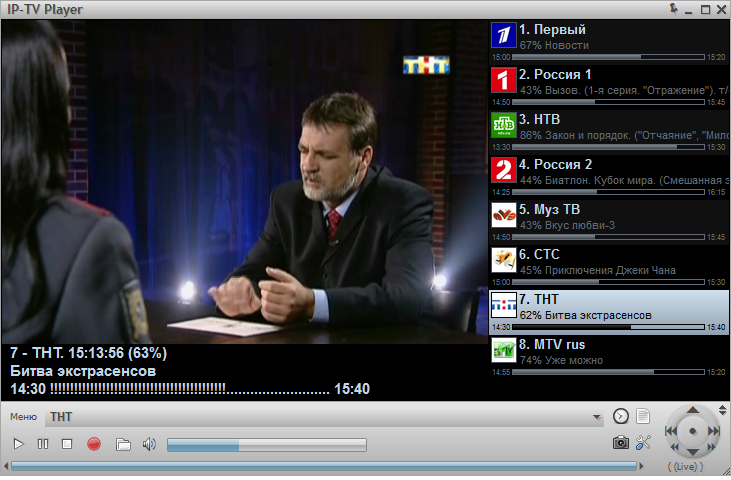
IPTV Player
About the Site
This site indexes and embeds the most popular videos from YouTube, Vimeo, FilmOn, DailyMotion and MUZU.TV. This site also allows you to search YouTube, Vimeo, DailyMotion in one go for the most popular matches for your search term. Additionaly you can watch live tv channels and video on demand from Filmon TV and search for music videos from MUZU. All features are powered by the repective site's API and Embed Codes.
If you are a content creator and wish for your video/s to be featured please send us and email/tweet with the link you want to be on our featured index. If you want a video removed from our index please change the sharing settings on your video host and also contact us via email for the listing to be removed and blacklisted.
Tuesday, March 31, 2015

Wednesday, March 11, 2015
Kodi
Kodi (formerly known as XBMC) is an award-winning free and open source (GPL) software media player and entertainment hub that can be installed on Linux, OSX, Windows, iOS, and Android, featuring a 10-foot user interface for use with televisions and remote controls. It allows users to play and view most videos, music, podcasts, and other digital media files from local and network storage media and the internet. Our forums and Wiki are bursting with knowledge and help for the new user right up to the application developer. We also have helpful Facebook, Google+, Twitter and Youtube pages.
Disclaimer: Kodi does not provide any media itself. Users must provide their own content or manually point Kodi to third party online services. The Kodi project does not provide any support for bootleg video content.

Channel Pear
cloud-based media library that lets you instantly add, manage, and watch between devices
channel PEAR is a collaborative, cloud-based media library that lets you instantly add, manage, and watch content across your favorite devices from free-to-air channels, our community media database, and anywhere else on the internet. No downloads or confusing server setups required - just login, pair your device, and watch!
Supported devices: Roku, Chromecast, iOS, Android (4.1+)
Supported media: M3U8 (HLS playlist), ISMV / ISM Manifest (Microsoft Smooth Streaming), MP4 (H.264), M4V (H.264), MOV (H.264), MKV (H.264), M4A (H.264), MRSS (Media RSS feeds)
channel PEAR is still in beta

Thursday, June 20, 2013
US TV Now

View on your PC, Mac, Mobile, Tablet, Roku, Vizio and more. Watch and record U.S. TV shows & movies over the Internet free with no commitments, cancel online anytime.
Thursday, April 4, 2013
XBMC


About
XBMC is an award-winning free and open source (GPL) software media player and entertainment hub for digital media. XBMC is available for Linux, OSX, and Windows. Created in 2003 by a group of like minded programmers, XBMC is a non-profit project run and developed by volunteers located around the world. More than 50 software developers have contributed to XBMC, and 100-plus translators have worked to expand its reach, making it available in more than 30 languages.While XBMC functions very well as a standard media player application for your computer, it has been designed to be the perfect companion for your HTPC. Supporting an almost endless range of remote controls, and combined with its beautiful interface and powerful skinning engine, XBMC feels very natural to use from the couch and is the ideal solution for your home theater.
Currently XBMC can be used to play almost all popular audio and video formats around. It was designed for network playback, so you can stream your multimedia from anywhere in the house or directly from the internet using practically any protocol available. Use your media as-is: XBMC can play CDs and DVDs directly from the disk or image file, almost all popular archive formats from your hard drive, and even files inside ZIP and RAR archives. It will even scan all of your media and automatically create a personalized library complete with box covers, descriptions, and fanart. There are playlist and slideshow functions, a weather forecast feature and many audio visualizations. Once installed, your computer will become a fully functional multimedia jukebox.
It is difficult to put into words all that XBMC can do, head to the gallery to see some examples, or take the plunge and Try it Today.
Wednesday, February 27, 2013
Plex
.jpg)

Center PC? O simplemente prefieren tener una interfaz más amigable para
ver vídeos / películas / series?
Plex es, de lejos, una de las mejores alternativas disponibles no sólo porque
tiene una interfaz de usuario sumamente amigable y elegante, sino que nos
permite hacer más, que sólo navegar por nuestros medios.

Plex es similar a XBMC, y por un buen motivo: está basado este otro programa. Sin embargo, Plex resulta mucho más amigable, cuenta con una mayor cantidad de “Apps” (que, de paso, son más simples de instalar), y “canales”, que representan varios canales online de video, como Netflix, Vimeo, YouTube, TED. Si cuentan con un VPN, pueden acceder también a NBC, MTV, Hulu, entre otros.

La gran ventaja de Plex, sin embargo es que, como decíamos al inicio, no sólo se trata de un reproductor de medios. Si tienen un android, iPhone o iPad, pueden usar el Media Server y enviar todo el contenido que tengan en Plex, directamente al dispositivo móvil. Basta con estar en la misma red Wifi, y Plex se encargará no sólo de mostrarnos todos los videos disponibles, sino que los convertirá, en tiempo real a un formato compatible. Esto significa que podemos ver nuestros MKVs, AVIs y demás, directamente en el iPhone / Android / iPad, vía streaming. Y todo, se mantiene sincronizado. Si empiezan a ver una serie en la TV, pueden continuarla exactamente donde se quedaron, desde el teléfono.

Si están buscando una alternativa a Boxee, ahora que ha desparecido, o probaron XBMC y no les agradó, les recomiendo que le den un vistazo a Plex (y sus apps móviles). De todas las opciones, es el que resulta más amigable.
Plex Media Center está disponible para Windows y Macs.
Sunday, June 28, 2009
Readon TV Movie Radio Player

Readon TV Movie Radio Player es un programa que te permite observar emisiones de TV por satelite y las últimas películas directamente desde tu computador. Sin necesidad de equipo adicional tendrás acceso a un nuevo mundo de entretenimiento digital.
Con éste programa podrás observar miles de estaciones de todo el mundo, canales de deporte en vivo, grabar música online a mp3, grabar TV en formato de video asf y mucho más!
Nota: Contiene canales para adultos, que pueden ser bloqueados y luego habilitados mediante contraseña.
Con éste programa podrás observar miles de estaciones de todo el mundo, canales de deporte en vivo, grabar música online a mp3, grabar TV en formato de video asf y mucho más!
Nota: Contiene canales para adultos, que pueden ser bloqueados y luego habilitados mediante contraseña.
Subscribe to:
Posts (Atom)


