Showing posts with label Social Network. Show all posts

Wednesday, July 19, 2017

Technitium MAC Address Changer

A freeware utility to spoof MAC address instantly

Version 6.0.7

Download
Official Torrent
System Requirements
Windows 10/8.1/8/7/Vista/XP/Server 2012 R2/Server 2012/Server 2008 R2/Server 2008/Server 2003/Server 2000
What's New?
Read this blog post to know what's new in this release.
File Details
NameTMACv6.0.7_Setup.zip
FormatZIP File
Size2.10 MB
SHA17585C61B 7F2557F8 5FCAF82D 1FB1080F A947BCE0
SHA2566E63BECA F5C5E17A 9D3AFB6E 2104EEE3 DBE473C8 930AE878 3EBA0FED ADB4A152
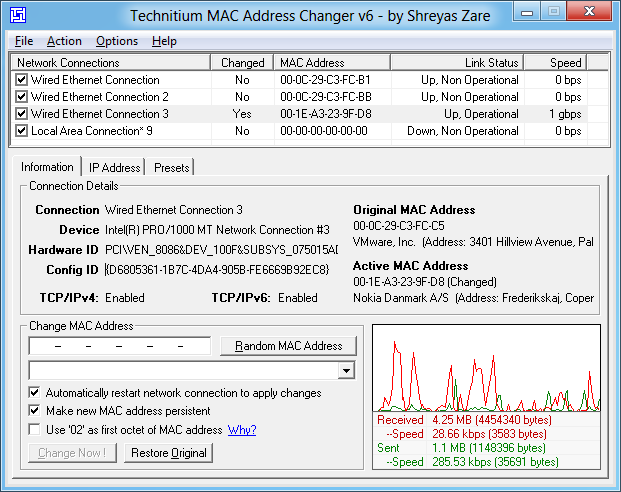
Technitium MAC Address Changer Screen Shot
Technitium MAC Address Changer allows you to change (spoof) Media Access Control (MAC) Address of your Network Interface Card (NIC) instantly. It has a very simple user interface and provides ample information regarding each NIC in the machine. Every NIC has a MAC address hard coded in its circuit by the manufacturer. This hard coded MAC address is used by windows drivers to access Ethernet Network (LAN). This tool can set a new MAC address to your NIC, bypassing the original hard coded MAC address. Technitium MAC Address Changer is a must tool in every security professionals tool box.

Features

  • Works on Windows 10, 8 & 7 for both 32-bit and 64-bit.
  • Enhanced network configuration presets with IPv6 support allow you to quickly switch between network configurations.
  • Allows complete configuration of any network adapter.
  • Command line options with entire software functionality available. You can select a preset from specified preset file to apply directly.
  • Update network card vendors list feature allows you to download latest vendor data (OUI) from IEEE.org.

How Does It Work?

This software just writes a value into the windows registry. When the Network Adapter Device is enabled, windows searches for the registry value 'NetworkAddress' in the key HKEY_LOCAL_MACHINE\SYSTEM\CurrentControlSet\Control\Class\{4D36E972-E325-11CE-BFC1- 08002bE10318}\[ID of NIC e.g. 0001]. If a value is present, windows will use it as MAC address, if not, windows will use the hard coded manufacturer provided MAC address. Some Network Adapter drivers have this facility built-in. It can be found in the Advance settings tab in the Network Adapter's Device properties in Windows Device Manager.

How To Change MAC Address

  1. Starting MAC address changer will list all available network adapters.
  2. Select the adapter you want to change the MAC address. You will get the details of your selection below.
  3. In the Information tab, find the Change MAC Address frame. Enter new MAC address in the field and click Change Now! button. You may even click Random MAC Address button to fill up a randomly selected MAC address from the vendor list available.
  4. To restore the original MAC address of the network adapter, select the adapter, click Restore Original button in the Change MAC Address frame.
NOTE: This tool cannot change MAC address of Microsoft Network Bridge. Network Bridge will automatically use the original MAC address of the first NIC added into bridge with the first octet of MAC address set to 0x02.

Help Topics

Click here for frequently asked help queries.

Blog

Read this blog post for more details on issues with wireless networks and w

Thursday, March 16, 2017

Sunday, September 28, 2014

Friday, June 3, 2011

box

The simple, secure way to manage and share content

Box helps more than 50,000 businesses around the world manage content, share files and collaborate with others quickly, easily and securely. We can help you too.


Wednesday, February 9, 2011

Windows Live

Windows Live

Your life. Your stuff. All together with Windows Live.

Keep in touch from your PC, phone, or the web. Send rich email, IM or video chat*, and share social updates. And with Windows Live Essentials on your PC, you can do even more with your photos, videos, and email. Windows Live Essentials is free and includes Windows Live Messenger, Photo Gallery, and Movie Maker.
Learn more about Windows Live Essentials

Sign up now—it’s free!
Already use Windows Live? Sign in
* Requires a compatible microphone, speakers or headset, webcam, and broadband connection.

How to use Windows Live

How to use Windows Live

Get a Windows Live ID

Your Windows Live ID gets you into all of your Windows Live services with a single sign-in, including Hotmail, Messenger, and SkyDrive.

See all your social updates

You can connect Windows Live with more than 75 other services, including Facebook and YouTube.

Create documents online

Create, share, and edit Microsoft Office files on the web. Office Web Apps look and work like the desktop programs you're already familiar with for Word, Excel, PowerPoint, and OneNote files.

Thursday, February 3, 2011

Skype

Videollamadas

Videollamadas

Las videollamadas gratuitas facilitan reunirte con otras personas, aun si no están cerca. Ahora con videollamadas grupales.

Ver cómo

Llamadas a teléfonos fijos y móviles

Llamadas a teléfonos fijos y móviles

Llama a teléfonos a las mejores tarifas desde 1,9c/min*** o incluso menos con un plan.

Ver tarifas

Mensajería instantánea

Mensajería instantánea

Ya sea que tengas una pregunta rápida o desees charlar con tus amigos, escribe y conversa cuando quieras.

Ver más características gratuitas

Skype Manager

Skype Manager

Administra Skype para todos en tu trabajo.


Obtener Skype Manager


Thursday, April 8, 2010

Ustream.tv


Create your own broadcast! It takes just minutes...

1. Create your Ustream account

2. Plug in your cam

3. Log in, then select "Your Shows"

4. Type in the name of your show, then click "Broadcast Now"

5. When asked, "allow" the broadcast console to access your video camera or webcam

6. Click "Start Broadcast" in the console. You are now live!

It's that easy. Sign up for Ustream now!

Wednesday, July 23, 2008

Pidgin


What is Pidgin?

Pidgin is a multi-protocol Instant Messaging client that allows you to use all of your IM accounts at once.
Pidgin can work with:
  • AIM
  • Bonjour
  • Gadu-Gadu
  • Google Talk
  • Groupwise
  • ICQ
  • IRC
  • MSN
  • MySpaceIM
  • QQ
  • SILC
  • SIMPLE
  • Sametime
  • XMPP
  • Yahoo!
  • Zephyr
Pidgin is free software. It is licensed under the GNU General Public License (GPL) version 2. This means you are free to use it and to modify it, but if you distribute your modifications you must distribute the modified source code as well.

Monday, June 2, 2008

Chatea con aMSN


aMSN is an free open source MSN Messenger clone, featuring: » Offline Messaging
» Voice Clips
» A New Login Window & Contact List (As of 0.97)
» Display pictures
» Custom emoticons
» Multi-language support (around 40 languages currently supported)
» Sign in to more than one account at once
» File transfers
» Group support
» Normal, and animated emoticons with sounds
» Chat logs
» Event alarms
» Webcam support
» History in color
» Ability to autoclose the filetransfer window when it is finished
» New plugins log window (Alt-P)
» Plugins compatible with supported languages
» Faster loading skin window
» Skins in chatwindow
» Resizable chatwindow bottom
» When you add a new user, you can define in which group you want to add them
» When a contact change status, the top of the chat window changes color ( green for away, grey for offline, etc.)
» New panel GUI to alert when there's a new aMSN version
» Possibility to download the new release directly by aMSN
» Automatically update language files and plugins from the web
» New gui for deleting users (also possible to block on deletion)
» Possible to add notes for each user (XML)
» Support for MSN Mobile service
» Tabbed windows so you can group conversations using tabs
» Status is displayed inside a frame, so it won't dissapear when you scroll
» Display picture in notification alert (like MSN 7)
» Statistics for history (logging)
» Now possible to choose any state for your login status (before it was only possible to login invisible or online)
» Timestamping

But that's not all! More features can be added to aMSN with plugins, or for the adventurous, completely change the look of aMSN with different skins!