Wednesday, April 15, 2015

3D Slorar System Simulator


Learn more about our solar system. The amazing 3D graphics will make you feel as if you were traveling through the universe.
Learn how far other planets are from earth. Learn about the stars, planets, galaxies, and more!

Wednesday, April 8, 2015

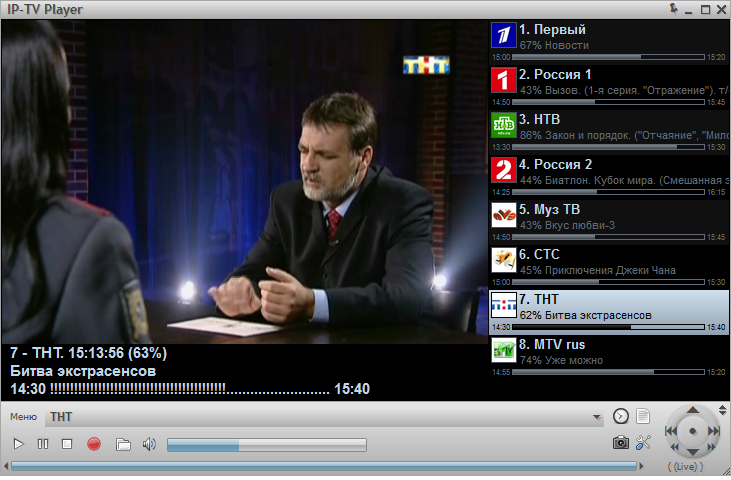
IPTV Player

About the Site

This site indexes and embeds the most popular videos from YouTube, Vimeo, FilmOn, DailyMotion and MUZU.TV. This site also allows you to search YouTube, Vimeo, DailyMotion in one go for the most popular matches for your search term. Additionaly you can watch live tv channels and video on demand from Filmon TV and search for music videos from MUZU. All features are powered by the repective site's API and Embed Codes.
If you are a content creator and wish for your video/s to be featured please send us and email/tweet with the link you want to be on our featured index. If you want a video removed from our index please change the sharing settings on your video host and also contact us via email for the listing to be removed and blacklisted.

Tuesday, March 31, 2015

Monday, March 23, 2015

Download Windows 10 Technical Preview ISO

Follow these steps to download Technical Preview:
  • Sign up for the Windows Insider Program, if you haven't already.
  • Click one of the Download links on this page to download a special file—it's called an ISO file—that you can use to install the preview.
  • When the download is complete, transfer the ISO file to installation media such as a USB flash drive or DVD.
  • Boot your PC from the installation media, and then follow the steps to perform a clean install.
A PC running Windows 10 Technical Preview

Important

    • You'll need a third-party program to convert the ISO file into installable media—DVD burning software often includes this capability.
    • Remember, trying out an early build like this can be risky. That's why we recommend that you don't install the preview on your primary home or business PC. Unexpected PC crashes could damage or even delete your files, so you should back up everything.
    • If you want to stop using Windows 10 Technical Preview and return to your previous version of Windows, you'll need to reinstall your previous version from the recovery or installation media that came with your PC—typically a DVD. If you don't have recovery media, you might be able to create recovery media from a recovery partition on your PC using software provided by your PC manufacturer. You'll need to do this before you upgrade. Check the support section of your PC manufacturer's website for more info.
    • After you install Windows 10 Technical Preview, you won’t be able to use the recovery partition on your PC to go back to your previous version of Windows.

Friday, March 13, 2015

HD Cinema

HD Cinema

Download the app to watch the latest Anime, Movie, Cartoon, TV Show in HD
Watch the latest anime shows like Tom and Jerry, Larva, Superman, Iron man, the Avengers, Naruto Shippuden and more.
- Easy to use
- Multi-Server, Search, Download, Favorites
- 720p, 1080p and Fast Streaming
- User LocalCast for Chromecast/DLNA
- Updated every 24 hours


Wednesday, March 11, 2015

Kodi

Kodi (formerly known as XBMC) is an award-winning free and open source (GPL) software media player and entertainment hub that can be installed on Linux, OSX, Windows, iOS, and Android, featuring a 10-foot user interface for use with televisions and remote controls. It allows users to play and view most videos, music, podcasts, and other digital media files from local and network storage media and the internet. Our forums and Wiki are bursting with knowledge and help for the new user right up to the application developer. We also have helpful Facebook, Google+, Twitter and Youtube pages.

Disclaimer: Kodi does not provide any media itself. Users must provide their own content or manually point Kodi to third party online services. The Kodi project does not provide any support for bootleg video content.

Click Here

Channel Pear

cloud-based media library that lets you instantly add, manage, and watch between devices
channel PEAR is a collaborative, cloud-based media library that lets you instantly add, manage, and watch content across your favorite devices from free-to-air channels, our community media database, and anywhere else on the internet. No downloads or confusing server setups required - just login, pair your device, and watch!

Supported devices: Roku, Chromecast, iOS, Android (4.1+)


Supported media: M3U8 (HLS playlist), ISMV / ISM Manifest (Microsoft Smooth Streaming), MP4 (H.264), M4V (H.264), MOV (H.264), MKV (H.264), M4A (H.264), MRSS (Media RSS feeds)

channel PEAR is still in beta

Click Here

Sunday, February 15, 2015

AdwCleaner

AdwCleaner is a free removal tool for :
  • Adware (ads softwares)
  • PUP/LPI (Potentially Undesirable Program)
  • Toolbars
  • Hijacker (Hijack of the browser's homepage)
It works with a Search and Delete mode. It can be easily uninstalled using the mode "Uninstall".
It's compatible with Windows XP, Vista, 7, 8, 8.1 in 32 & 64 bits.