Thursday, August 29, 2013

Download a Set of Free Tools for Managing Hyper-V R2


Follow Our Daily Tips
Windows Server 2008 R2 Hyper-V can be managed locally or remotely from another Windows Server 2008 R2 server using the Hyper-V Manager console. Hyper-V Server 2008 R2 does not provide a graphical user interface because it is designed to be managed remotely. 

An option for managing Windows Server 2008 R2 Hyper-V and Hyper-V Server 2008 R2 is to use the Remote Server Administration Tools (RSAT) for Windows 7. You can download RSAT for Windows 7 for free from the Microsoft Web site. 

RSAT for Windows 7, which can be installed on either an x86 or x64 version of the OS, includes a variety of tools including Hyper-V Manager and Failover Cluster Manager. After you download and install RSAT for Windows 7, you can enable all the available tools or only a selection of tools using the Windows Features control panel applet. And you can access the tools from Administrative Tools in Windows 7. 

From the Microsoft Press book Windows Server 2008 Hyper-V Resource Kit by Robert Larson and Janique Carbone with the Windows Virtualization Team at Microsoft.

Friday, August 23, 2013

Get the Full Path of a Folder or File in Windows 7


Follow Our Daily Tips
If you recently moved from Windows XP to Windows 7, you probably noticed that the address bar no longer shows the full path of the current folder in the traditional way – you’re probably used to seeing backslash characters separating folder names. If you need to see the full path displayed that way, click anywhere to the right of the path in the address bar or right-click any part of the address bar and choose Edit Address.

The right-click shortcut menu includes additional options that allow you to copy the current address to the Clipboard. Click Copy Address to save the location in a format that is optimized for copying and pasting folders in Windows Explorer or use Copy Address As Text if you plan to paste the folder path into a document.

To copy the full path for an individual file, hold down the Shift key as you right-click the file, and then choose Copy As Path. This option is especially useful if you’ve found a file in Windows Explorer and you want to upload it to a Web site or open it in another program without browsing to the same location in an Open dialog box. Copy the full path for the file, then paste it into the File Name box in the target program.


Wednesday, August 21, 2013

Where Sticky Notes are Stored


Microsoft added Sticky Notes with Vista, and changed them entirely with Windows 7. In Vista, you can write longhand sticky notes with a mouse or pointer, or record them with a microphone, but you can't actually type them with a keyboard. Windows 7 does it the other way around.
But both versions save the notes in a file called StickyNotes.snt, located in the C:\Users\login\AppData\Roaming\Microsoft\Sticky Notes folder. (When I write login, I mean the name you use to log into Windows.) You can easily get to C:\Users\login\AppData\Roaming by selecting Start, typing %appdata%, and pressingENTER.
So if you make a lot of notes, you should make sure that your backup routine includes that folder. In fact, it's a good idea to backup the entire AppData folder.

Live Countdown Timer With Animations


Animated Countdown that counts down in seconds, minutes, hours and days to any date. Takes Time Zone & DST into account, and it can also count up!
Choose a design (Birthday, Sports, Baby Due Date, Wedding, and more), select your colors and add your own personalized message. More designs available soon.
Share the Countdown with anyone anywhere - just copy the web address (URL).


Saturday, August 17, 2013

Checking your Ubuntu Version

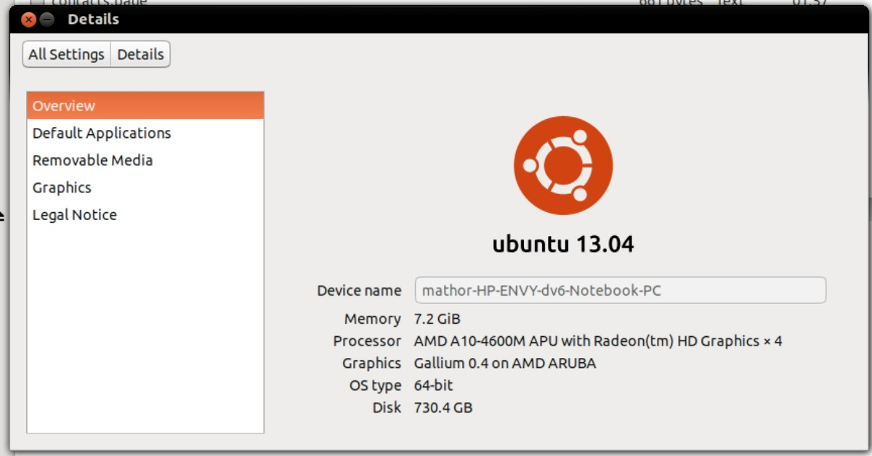
There are two ways to check which version of Ubuntu you are running. You can either check from within Unity, or put in a short command in the Terminal.

In Unity

Unity is the default desktop environment for Ubuntu 12.04 (Precise Pangolin) and later.
unity1.jpg
  1. Click on the "cog" in the upper-right portion of the screen.
  2. Select the option: About This Computer

In the Terminal

This method will work no matter which version of Ubuntu or desktop environment you are running.
terminal.png
  1. Open the Terminal (keyboard shortcut: Ctrl+Alt+T)
  2. Enter the command lsb_release -a
Your version will be shown on the Description line.

Monday, August 12, 2013

AutoDesk HomeStyler

Monday, July 29, 2013

Huge collection of Free Microsoft eBooks for you, including: Office, Office 365, SharePoint, SQL Server, System Center, Visual Studio, Web Development, Windows, Windows Azure, and Windows Server

Last summer I put up a post that offered a collection of free Microsoft eBooks across a variety of topics and the response was incredible. Because of the phenomenal response, I followed it up with a second post that contained another set of free eBooks for people to download. After these posts went live, over 1,000,000 free eBooks were downloaded by people around the world!
UPDATE: We’ve surpassed 3.5 MILLION downloads! (Click to read more)
Well, I thought I would once again put together another new collection of absolutely FREE Microsoft eBooks for all of you to access and download to use in your quest for information, resources, knowledge, etc. As with the past collections, these eBooks are completely FREE, they are not time-bombed, there is no catch, and yes, please let your friends, family, colleagues, or anyone else that you think would benefit from these know that they are available here and to come download the ones they are interested in. I’d love to give away another 1,000,000 free eBooks again this round, so spread the word and please enjoy these resources from Microsoft to you.
Office & Office 365
image
Deployment guide for Office 2013
EPUB MOBI PDF
image
Microsoft Office 365 for professionals and small businesses: Help and How To
EPUB MOBI PDF
SharePoint
image
Explore SharePoint 2013
EPUB MOBI PDF
image
Deployment guide for SharePoint 2013
EPUB MOBI PDF
image
Test Lab Guide: eBook for SharePoint Server 2013 Intranet and Team Sites
EPUB MOBI PDF DOC
image
Create a Balanced Scorecard (SharePoint Server 2010)
EPUB MOBI PDF
image
SharePoint Server for Business Intelligence
EPUB MOBI PDF
SQL Server
image
5 Tips for a Smooth SSIS Upgrade to SQL Server 2012
EPUB MOBI PDF
image
A Hitchiker's Guide to Microsoft StreamInsight Queries
EPUB MOBI PDF
image
Data Mining Extensions (DMX) Reference
EPUB MOBI PDF
image
Data Quality Services 
EPUB MOBI PDF
image
High Availability Solutions
EPUB MOBI PDF
image
Master Data Services
EPUB MOBI PDF
image
Monitor and Tune for Performance
EPUB MOBI PDF
image
Multidimensional Expressions (MDX) Reference
EPUB MOBI PDF
image
SQL Server Distributed Replay
EPUB MOBI PDF
image
Transact-SQL Data Definition Language (DDL) Reference
EPUB MOBI PDF
image
XQuery Language Reference
EPUB MOBI PDF
image
Extracting and Loading SharePoint Data in SQL Server Integration Services
EPUB MOBI PDF
image
Integration Services: Extending Packages with Scripting
EPUB MOBI PDF
image
Multidimensional Model Programming
EPUB MOBI PDF
image
Optimized Bulk Loading of Data into Oracle
EPUB MOBI PDF
image
Planning Disaster Recovery for Microsoft SQL Server Reporting Services in SharePoint Integrated Mode
EPUB MOBI PDF
image
SQL Server 2012 Tutorials: Reporting Services
EPUB MOBI PDF
image
SQL Server 2012 Tutorials: Writing Transact-SQL Statements
EPUB MOBI PDF
image
SQL Server Community FAQs Manual
EPUB MOBI PDF
System Center
image
Cmdlet Reference for App Controller in System Center 2012 SP1
EPUB MOBI PDF
image
Technical Documentation for System Center 2012 - Virtual Machine Manager
EPUB MOBI PDF
Visual Studio
image
Better Unit Testing with Microsoft Fakes
EPUB MOBI PDF
image
Dependency Injection with Unity
PDF
image
Developer's Guide to Microsoft Enterprise Library (Second Edition)
PDF
image
Testing for Continuous Delivery with Visual Studio 2012
PDF
image
Upgrade Team Foundation Server 2012: the ultimate upgrade guide
EPUB MOBI PDF
Web Development
image
ASP.NET Multi-Tier Windows Azure Application Using Storage Tables, Queues, and Blobs
EPUB MOBI PDF
image
ASP.NET Web Deployment using Visual Studio
EPUB MOBI PDF
image
Developing Modern Mobile Web Apps
EPUB MOBI PDF
image
The Entity Framework 4.0 and ASP.NET Web Forms – Getting Started
EPUB MOBI PDF
image
Getting Started with the Entity Framework 4.1 using ASP.NET MVC
EPUB MOBI PDF
image
Project Silk: Client-Side Web Development for Modern Browsers
PDF
Windows
image
Administrator's Guide for Microsoft Application Virtualization (App-V) 5.0
EPUB MOBI PDF
image
Administrator’s Guide for Microsoft BitLocker Administration and Monitoring 1.0
EPUB MOBI PDF
image
Administrator’s Guide for Microsoft Diagnostics and Recovery Toolset (DaRT) 7
EPUB MOBI PDF
image
Administrator’s Guide for Microsoft Diagnostics and Recovery Toolset (DaRT) 8.0
EPUB MOBI PDF
image
Administrator’s Guide for Microsoft User Experience Virtualization (UE-V) 1.0
EPUB MOBI PDF
image
Developing an end-to-end Windows Store app using C++ and XAML: Hilo
PDF
image
Developing an end-to-end Windows Store app using JavaScript: Hilo
PDF
image
Prism for the Windows Runtime: Developing a Windows Store business app using C#, XAML, and Prism
PDF
image
Programming Windows 8 Apps with HTML, CSS, and JavaScript
EPUB MOBI PDF
Windows Azure
image
Autoscaling Application Block and Transient Fault Handling Application Block Reference
EPUB MOBI PDF
image
Create Your First Application: Node.js and Windows Azure
EPUB MOBI PDF
image
Developing Multi-tenant Applications for the Cloud on Windows Azure (3rd Edition)
PDF
image
Drupal on Windows Azure
EPUB MOBI PDF
image
Exploring CQRS and Event Sourcing: A journey into high scalability, availability, and maintainability with Windows Azure
PDF
image
Migrating Data-Centric Applications to Windows Azure
EPUB MOBI PDF
image
Moving Applications to the Cloud on Windows Azure (3rd Edition)
PDF
image
Using Windows Azure Mobile Services to Cloud-Enable your iOS Apps
EPUB MOBI PDF
image
Using Windows Azure Mobile Services to Cloud-Enable Your Windows Phone 8 Apps
EPUB MOBI PDF
image
Using Windows Azure Mobile Services to Cloud-Enable your Windows Store Apps in C#
EPUB MOBI PDF
image
Using Windows Azure Mobile Services to Cloud-Enable Your Windows Store Apps in JavaScript
EPUB MOBI PDF
image
Windows Azure and SQL Database Tutorials
EPUB MOBI PDF
Windows Server
image
A Guide to Claims-Based Identity and Access Control, Second Edition
PDF
image
Introducing Windows Server 2012
EPUB MOBI PDF
image
TCP/IP Fundamentals for Microsoft Windows
PDF
I hope you find these resources to be helpful in learning about and using the various solutions and technologies referenced. I’d love to hear your feedback on these, so please feel free to give me your input. Also, be sure to check back over the next week or so, as I may possibly be adding some additional ones on here.
Did you find this information helpful? If so, you may want to make sure you are utilizing all of the areas I share information online, such as: