
Saber si tu IP esta en el black listhttp://www.check2ip.com/
Wednesday, July 19, 2017
Technitium MAC Address Changer
A freeware utility to spoof MAC address instantly
Version 6.0.7
Download
Official Torrent
System Requirements
Windows 10/8.1/8/7/Vista/XP/Server 2012 R2/Server 2012/Server 2008 R2/Server 2008/Server 2003/Server 2000
What's New?
Read this blog post to know what's new in this release.
File Details
NameTMACv6.0.7_Setup.zip
FormatZIP File
Size2.10 MB
SHA17585C61B 7F2557F8 5FCAF82D 1FB1080F A947BCE0
SHA2566E63BECA F5C5E17A 9D3AFB6E 2104EEE3 DBE473C8 930AE878 3EBA0FED ADB4A152
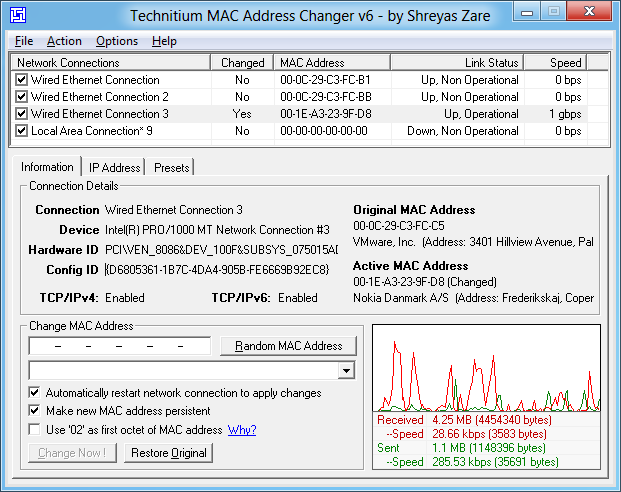
Technitium MAC Address Changer allows you to change (spoof) Media Access Control (MAC) Address of your Network Interface Card (NIC) instantly. It has a very simple user interface and provides ample information regarding each NIC in the machine. Every NIC has a MAC address hard coded in its circuit by the manufacturer. This hard coded MAC address is used by windows drivers to access Ethernet Network (LAN). This tool can set a new MAC address to your NIC, bypassing the original hard coded MAC address. Technitium MAC Address Changer is a must tool in every security professionals tool box.
Features
- Works on Windows 10, 8 & 7 for both 32-bit and 64-bit.
- Enhanced network configuration presets with IPv6 support allow you to quickly switch between network configurations.
- Allows complete configuration of any network adapter.
- Command line options with entire software functionality available. You can select a preset from specified preset file to apply directly.
- Update network card vendors list feature allows you to download latest vendor data (OUI) from IEEE.org.
How Does It Work?
This software just writes a value into the windows registry. When the Network Adapter Device is enabled, windows searches for the registry value 'NetworkAddress' in the key HKEY_LOCAL_MACHINE\SYSTEM\CurrentControlSet\Control\Class\{4D36E972-E325-11CE-BFC1- 08002bE10318}\[ID of NIC e.g. 0001]. If a value is present, windows will use it as MAC address, if not, windows will use the hard coded manufacturer provided MAC address. Some Network Adapter drivers have this facility built-in. It can be found in the Advance settings tab in the Network Adapter's Device properties in Windows Device Manager.
How To Change MAC Address
- Starting MAC address changer will list all available network adapters.
- Select the adapter you want to change the MAC address. You will get the details of your selection below.
- In the Information tab, find the Change MAC Address frame. Enter new MAC address in the field and click Change Now! button. You may even click Random MAC Address button to fill up a randomly selected MAC address from the vendor list available.
- To restore the original MAC address of the network adapter, select the adapter, click Restore Original button in the Change MAC Address frame.
NOTE: This tool cannot change MAC address of Microsoft Network Bridge. Network Bridge will automatically use the original MAC address of the first NIC added into bridge with the first octet of MAC address set to 0x02.
Help Topics
Click here for frequently asked help queries.
Blog
Read this blog post for more details on issues with wireless networks and w
Friday, July 7, 2017
LeapDroid
LeapDroid, the newest superfast Android emulator for PCs

Given the huge number of programs that exist for running Android apps nowadays, it's tough for a new one to get noticed. Even so, LeapDroid stands out thanks to its surprisingly fast emulation that lets you run even the most recently released games.
This emulator stresses speed and offers very few options for customizing it, to the point that you can't even change the resolution or adjust any parameter except those found on your Android's own Settings panel. But when it comes time to play, the breakneck emulation speeds (which don't require any configuration) make up for this paucity of features. Just install the program, sync it with your Google account, and start using it.
LeapDroid is a good emulator that, like most of its competitors, runs a virtual machine in the background. However, this tool does sacrifice extra features so that your apps can run fluidly, even if they're more demanding in terms of their graphics processing.
This emulator stresses speed and offers very few options for customizing it, to the point that you can't even change the resolution or adjust any parameter except those found on your Android's own Settings panel. But when it comes time to play, the breakneck emulation speeds (which don't require any configuration) make up for this paucity of features. Just install the program, sync it with your Google account, and start using it.
LeapDroid is a good emulator that, like most of its competitors, runs a virtual machine in the background. However, this tool does sacrifice extra features so that your apps can run fluidly, even if they're more demanding in terms of their graphics processing.
LeapDroid, the newest superfast Android emulator for PCs
Android emulators are a dime a dozen these days due to the huge surge in demand for using Android-exclusive apps on desktop computers. Tools like BlueStacks, Andy, and Nox may be the most popular, but new and interesting alternatives still keep popping up. LeapDroid is one of the latest: it goes light on the extra functionalities to make way for smooth emulation, even for quite graphics-heavy games.
Wednesday, June 7, 2017
WindScribe Free VPN
Why Choose Windscribe?
Anonymously stream, download and browse content.
Made for the Privacy-Obsessed
If things like "DNS leakage" make you slam your fist on the table, then this FAQ will explain how our product is more privacy-obsessed than many of our VPN competitors.
View FAQWe Delete EVERYTHING
Your privacy is a right. We don't track you. We don't keep logs. We erase everything three minutes after your session closes.
Read our privacy policyWho's Tracking You Right Now?
Every wonder how much tracking a website has? Use our SecureLink tool to expose (and remove) tracking. Plus, send the link to a friend and if they give Windscribe a try, you'll earn some cash.
View Who's Tracking YouProtect your identity, download Windscribe now!
Download WindscribeThursday, June 1, 2017
Three more Kodi add-ons shut down as anti-piracy group turns up the heat on illegal streaming
More than any other streaming service, Kodi has come under fire for allowing users to access illegal content like movies , TV shows and Premier League football games.
Even though the software itself is perfectly legal, third-party sources use it as a distribution platform for foreign or illegal live streams .
Continued pressure from anti-piracy groups has already led to one stream - known as an "add-on" - closing down. Now it appears that more are following suit.
Several Kodi add-ons based in Israel have reportedly closed operations following pressure from a local group called ZIRA.

ZIRA filed for an injunction to stop the operation of these add-ons, and they have dutifully switched themselves off rather than incur heavy fines. One of the add-ons, Abeksis, was a popular hub for pirate content.
Even though these Kodi add-ons were based in Israel, they were accessible here in the UK because of the global nature of the software. Also, by using virtual private networks, Kodi users are able to access certain geographically-locked services.

According to TorrentFreak , even though these add-ons weren't monetising their service, and offered legal streams alongside illegal ones, the threat of a lawsuit was too much.
"The operators of the sites reportedly paid a settlement of a few thousand shekels. In addition, they will have to pay 100,000 more ($28,000) if the repositories or add-ons reappear in the future," the site explained.

The move echoes an earlier shutdown from the popular Navi-X add-on , which had been operating for 10 years up until last month.
"After ten years of successful operation, Navi-X has sadly being discontinued. Navi-X was first released in April 2007, and is the oldest Kodi add-on of its kind," the development team explained.
"The main reason why the decision was made to discontinue the Navi-X service is the current legal climate surrounding Kodi."
In recent months, Kodi has become a by-word for internet streaming piracy - even though the software itself doesn't host any media.
Thursday, March 16, 2017
Privacy badger

Privacy Badger blocks spying ads and invisible trackers.
Click here for Opera versionClick here for Chrome version

Privacy Badger FAQ
What is Privacy Badger?
How is Privacy Badger different from Disconnect, Adblock Plus, Ghostery, and other blocking extensions?
How does Privacy Badger work?
What is a third party tracker?
What do the red, yellow and green sliders in the Privacy Badger menu mean?
Why does Privacy Badger block ads?
Why doesn't Privacy Badger block all ads?
What about tracking by the sites I actively visit, like NYTimes.com or Facebook.com?
Does Privacy Badger contain a "black list" of blocked sites?
How was the cookie blocking yellowlist created?
Does Privacy Badger prevent fingerprinting?
Does Privacy Badger consider every cookie to be a tracking cookie?
Does Privacy Badger account for a cookie that was used to track me even if I deleted it?
Will you be supporting any other browsers besides Chrome / Firefox / Opera?
Can I download Privacy Badger outside of the Chrome Web Store?
I am an online advertising / tracking company. How do I stop Privacy Badger from blocking me?
What is the Privacy Badger license? Where is the Privacy Badger source code?
I found a bug! What do I do now?
How can I support Privacy Badger?
How does Privacy Badger handle social media widgets?
I'm having a problem installing the browser extension.
How do I uninstall/remove Privacy Badger?
Is Privacy Badger compatible with other extensions, including other adblockers?
AccessData

Since 1987, AccessData has been empowering our customers in their pursuit of liberty, justice and full spectrum data intelligence.
The search engine that doesn't track you.

We don’t store your
personal information. Ever.
Our privacy policy is simple: we don’t collect
or share any of your personal information.
or share any of your personal information.
We don’t follow you
around with ads.
We don’t store your search history. We therefore have nothing
to sell to advertisers that track you across the internet.
to sell to advertisers that track you across the internet.
We don’t track you in or out
of private browsing mode.
Other search engines track your searches even when you’re
in private browsing mode. We don’t track you — period.
in private browsing mode. We don’t track you — period.
Already a fan?
Invite friends to the Duck Side!
Share DuckDuckGo and help
friends take their privacy back!
friends take their privacy back!

Subscribe to:
Posts (Atom)


